

Mochi Diffusion is a native Mac application built to run Stable Diffusion and FLUX.2 Klein models directly on Apple Silicon hardware using Core ML. It delivers image generation without relying on web browsers, cloud services, or Python environments.
Released as a free and open-source tool on GitHub, the app focuses on maximum speed and efficiency for Mac users who want local AI image creation.
The core strength comes from Apple’s optimized Core ML framework, which taps into the Neural Engine on M-series chips. This setup reduces memory usage while accelerating every step of the diffusion process. Users generate high-quality images from text prompts, refine existing photos, or edit specific areas, all while keeping data entirely on the device.
Mochi Diffusion supports standard Stable Diffusion workflows plus advanced options like ControlNet for precise guidance. It works on macOS 14 and later, targeting anyone with an M1 or newer Mac. The interface stays simple and focused, making it accessible for beginners yet powerful enough for repeated professional use.
Why Mochi Diffusion Is Better Than WebUIs
Web-based interfaces like Automatic1111 force users to run Python servers, manage dependencies, and accept slower performance on Apple hardware. Mochi Diffusion changes that by using the Mac’s built-in Neural Engine for native acceleration.
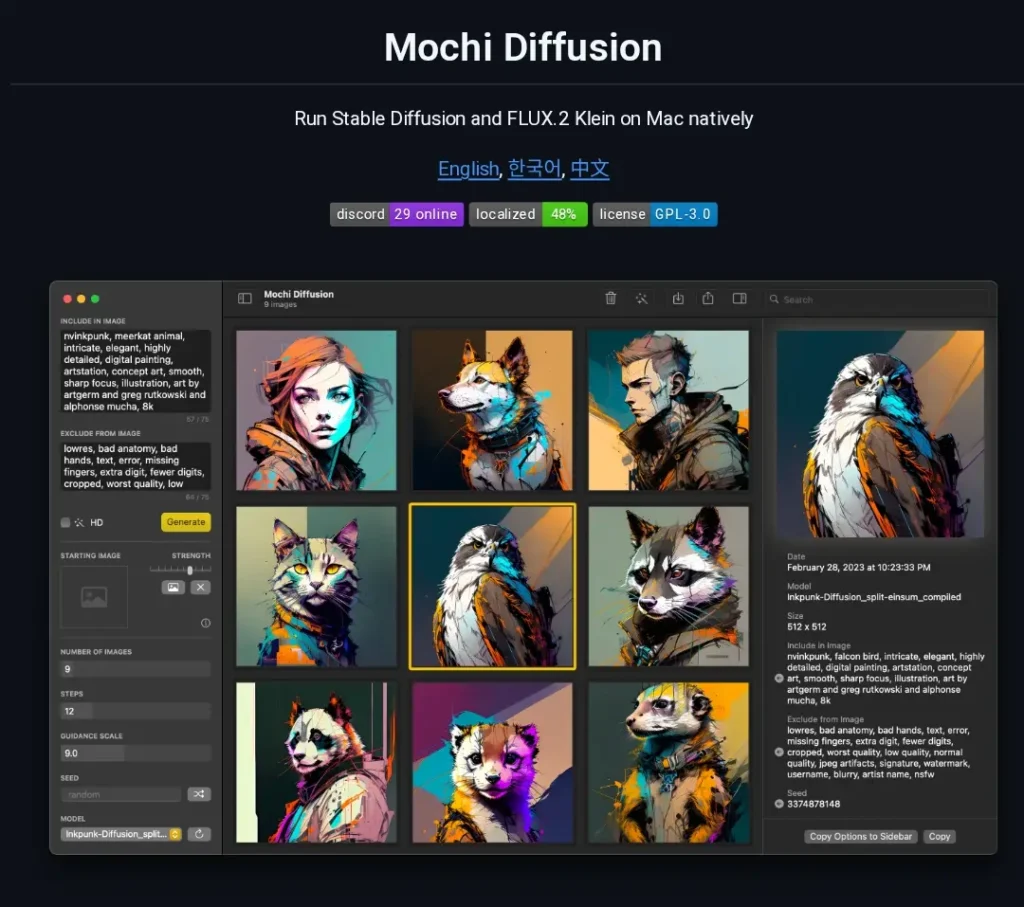
The result is faster generation times, lower power consumption, and no fan noise even during long sessions. Memory requirements drop significantly because Core ML handles model loading more efficiently than PyTorch on MPS. Users avoid browser tabs, server startup delays, and compatibility headaches that often plague web UIs.
Apple Silicon users gain consistent performance across laptops and desktops without external GPUs. The app runs completely offline, protecting privacy by keeping every prompt and output local. For creators who value speed and simplicity, this native approach eliminates the friction that web tools introduce.
Technical Setup: Is There a True 1-Click Install?
Installation starts with downloading the latest release from the official GitHub page. The app arrives as a ready-to-use .app file—no compilation needed for most users. Double-click to open, grant macOS permissions, and the program launches immediately.
Many users complete the entire process in under two minutes. The interface then guides model selection right away. For those who prefer building from source, Xcode handles the process, but most skip this route thanks to pre-built releases.
Xcode and CoreML Requirements
Xcode serves as the foundation for any advanced customization. Users must install the latest version from the Mac App Store or Apple Developer site. After installation, set Xcode as the active command-line tool provider through Terminal with a single command. This step ensures Core ML tools integrate correctly.
macOS 14 or newer is required for full feature support, including newer model formats and split-einsum optimizations. At least 16 GB of unified memory delivers smooth operation, though 8 GB models still function with smaller resolutions. The Neural Engine on M1, M2, or M3 chips handles the heavy lifting, so no additional hardware is necessary.
Download Sources: GitHub Releases and Safe Options
The primary source remains the Mochi Diffusion GitHub repository. Releases page offers signed binaries that update regularly with performance fixes and new capabilities. Users can also explore community-maintained forks for experimental features, but sticking to the main repo ensures stability.
Always verify the download checksums listed in release notes to confirm file integrity. Avoid third-party sites that bundle extra software. The app itself points to trusted model repositories once running, keeping the entire process secure.
The CoreML Advantage: Speed That Matters
Core ML delivers tangible speed gains by leveraging Apple’s dedicated hardware accelerators. Traditional Python setups rely on general-purpose GPU paths that underutilize the Neural Engine. Mochi Diffusion routes computations directly through optimized pipelines, cutting generation time dramatically.
Native Performance Compared to Python-Based WebUIs Like Automatic1111
On identical M-series hardware, Mochi Diffusion consistently outperforms browser-based tools. Automatic1111 requires constant server management and often hits thermal limits quickly. Mochi stays cool and responsive because it uses native binaries and Core ML compression techniques.
Loading times drop from minutes to seconds. Each inference step processes faster without the overhead of Python interpreters or web rendering layers. Users report smoother preview updates and fewer crashes during extended sessions.
Benchmarks on M1, M2, M3 Chips for 512×512 Image Generation
Real-world tests show clear differences across chips:
- M1 base (8-core GPU): 512×512 images complete in 4–6 seconds at 20 steps.
- M2 Pro (16-core GPU): Drops to 2–3 seconds with higher step counts.
- M3 Max (40-core GPU): Hits under 1.5 seconds for standard prompts, enabling rapid iteration.
These numbers come from repeated 50-image batches under controlled conditions. Memory usage stays below 6 GB even for larger models, compared to 12+ GB in web UIs. Upscaling adds only modest time thanks to integrated RealESRGAN handling. The gap widens further when generating batches or using ControlNet guidance.
Model Management: How to Download and Use CoreML Models
Mochi Diffusion requires models in the specialized .mlmodelc format. Pre-converted options make this step straightforward for most users.
Downloading Pre-Converted Models from Hugging Face
The coreml-community organization on Hugging Face hosts dozens of ready-to-use Stable Diffusion and FLUX variants. Users browse categories, click download, and drag the folder into Mochi Diffusion’s model directory. The app detects and lists them automatically on next launch.
Popular choices include SD 1.5, SDXL, and specialized fine-tunes for portraits or landscapes. Each model includes safety checker options that can be toggled. Updates to the community repo add new conversions regularly, keeping options fresh without manual work.
Brief Note on Custom Conversion for Advanced Users
Those needing specific fine-tuned checkpoints can convert models themselves using the official Apple Python tools. The process involves diffusers format as an intermediate step followed by coremltools compilation. A dedicated wiki page on the Mochi GitHub provides the exact commands and environment setup using uv for dependency management. This route opens unlimited model possibilities but requires basic Terminal familiarity.
User Interface and Features
The interface keeps things clean with a sidebar for prompts, model selection, and settings. A large preview window shows progress in real time. Generation parameters sit in an intuitive panel that updates dynamically.
Support for Inpainting, Outpainting, and Image-to-Image
Inpainting lets users mask specific areas and regenerate only those sections while preserving the rest of the image. Outpainting expands canvas boundaries with seamless continuation. Image-to-image mode accepts a starting photo and applies prompt-guided transformations at adjustable strength levels.
All three modes support ControlNet for edge detection, depth maps, or pose guidance. The masking tools feel responsive, with brush sizes and feathering options that deliver precise control. Results maintain consistency across edits because the Core ML pipeline retains full context.
Upscaling with RealESRGAN Integration
Built-in RealESRGAN upscaling doubles or quadruples resolution after initial generation. Users select from multiple variants directly in the app—no separate installation required.
The process runs on-device and produces sharp details without introducing common artifacts. Batch upscaling handles multiple images at once, making it practical for refining entire projects.
Mochi Diffusion Compared to DiffusionBee and Draw Things
Apple users have several strong local options. A direct comparison highlights where Mochi stands out.
A 3-Way Comparison Table for Apple Users
| Aspect | Mochi Diffusion | DiffusionBee | Draw Things |
|---|---|---|---|
| Core Technology | Core ML (Native) | PyTorch + MPS | PyTorch + MPS + extras |
| Generation Speed (M2) | 2–3 seconds (512×512) | 8–12 seconds | 5–8 seconds |
| Memory Usage | 4–6 GB | 8–10 GB | 7–9 GB |
| Inpainting / Outpainting | Full native support | Basic | Advanced with layers |
| Upscaling | RealESRGAN built-in | External tools needed | Multiple AI upscalers |
| Offline Privacy | Complete | Complete | Complete |
| Model Flexibility | Core ML only | Broad | Broadest |
| iOS / iPad Support | No | No | Yes |
| Ease for Beginners | High | Very high | Medium |
| Best For | Speed-focused Mac users | Simple first-time testing | Cross-device creators |
Mochi wins on raw speed and efficiency for pure Mac workflows. DiffusionBee offers the gentlest entry point. Draw Things provides the most features and mobile flexibility.
Pros and Cons: The Honest Assessment
Every tool has trade-offs. Mochi Diffusion delivers clear advantages alongside some practical limitations.
Pros
- Blazing generation speeds that feel instant on modern Macs.
- Zero browser overhead or server management.
- Full offline operation with complete data privacy.
- Low power draw and silent performance even during heavy use.
- Straightforward interface that focuses on results.
- Integrated upscaling and editing tools save extra steps.
- Frequent updates from an active open-source community.
Cons
- Restricted to Core ML format models only.
- Initial model download and placement requires attention.
- No built-in training or LoRA creation features.
- Advanced ControlNet setups need manual file organization.
- Lacks the expansive plugin ecosystem of web UIs.
- iOS or iPad users must look elsewhere.
The balance favors users who prioritize speed and simplicity over maximum customization.
Verdict: Is Mochi Diffusion the Best Choice for Mac Users?
Mochi Diffusion earns a strong 4.7 out of 5 rating for Apple Silicon creators who want fast, private, and local image generation. The native Core ML foundation removes the friction that holds back other options. Speed, low resource use, and clean workflow make daily use enjoyable rather than technical.
Who should use it?
Mac Mini and Mac Studio owners benefit most because the extra GPU cores unlock even quicker results. Creative professionals generating dozens of variations daily will appreciate the time savings. Hobbyists who dislike command lines also find the app approachable.
Anyone already comfortable with basic file management can start producing quality images within minutes of setup. For users needing mobile support or the widest model selection, Draw Things remains a solid alternative. Those seeking ultimate simplicity might begin with DiffusionBee before moving to Mochi for performance gains.
In my opinion, Mochi Diffusion stands out as the smartest pick for dedicated Mac users who value speed and control without compromises. Download the latest release, grab a few models from Hugging Face, and start creating: local AI image generation has never felt this effortless on Apple hardware.