

Is Recraft V3 AI worth it? Quick verdict
Right now, most creators need tools that deliver clean, editable results fast without endless tweaks. Recraft V3 stands out because it handles vectors, precise text, and full design layouts in one place.
It ranks at the top of image quality benchmarks and gives designers something Midjourney and DALL-E often miss: production-ready files they can actually use right away. At $10 a month for the basic paid plan, it offers solid value for anyone who turns ideas into visuals daily.
The free tier works for quick tests, but paid unlocks private files and commercial rights that matter for real work. Overall, Recraft V3 earns a strong recommendation for designers and teams who want control and scalability without switching between five different apps.
Best for:
- Graphic designers and UI/UX teams building consistent illustration systems
- Brand managers creating logos, icons, and marketing assets
- Content creators needing sharp text inside images for social posts or ads
- Freelancers who export vectors for print or web projects
- Teams that collaborate on mockups and style guides in one workspace
Skip if:
- You only want highly artistic or cinematic images with wild creativity
- You prefer Discord-style prompting and community remixing
- Your workflow stays entirely in raster formats like PNG without vectors
- Budget is zero and you cannot commit to even a low monthly plan
Quick specs table
| Aspect | Details | Limitation | Best for |
|---|---|---|---|
| Core Model | Recraft V3 (design-first AI) | Higher credit cost for vectors | Designers needing precision |
| Output Types | Raster + native SVG vectors | No native video yet | Logos, icons, UI elements |
| Text Rendering | Long, accurate text at any size/position | Learning specific prompt style | Posters, packaging, ads |
| Infinite Canvas | Manage multiple images and layouts in one view | Browser can lag with 20+ heavy files | Storyboards and full campaigns |
| Style Control | Presets + custom styles without retraining | Fewer “artsy” wild styles | Brand consistency |
| Editing Tools | Inpainting, recolor, upscale, magic wand | Some tools limited on free tier | Quick refinements |
| Generation Speed | 4–12 seconds per image (paid priority) | Slower during peak hours on free | Fast iteration workflows |
| Pricing Entry | Free (limited) → $10/mo Basic | Credits reset monthly | Professional daily use |
How Recraft V3 was tested
Testing happened across a full week of real projects to check everyday performance. First, a set of 50 prompts focused on vector logos and icons to measure consistency and editability. Next, complex layouts with multiple text blocks and overlapping elements were generated to test the infinite canvas workflow.
Then, raster-to-vector conversions checked how clean the SVG exports turned out compared to manual tracing. After that, brand style matching used uploaded reference images to see how well the model locked in colors and aesthetics across 10 variations.
Finally, side-by-side comparisons ran the same prompts in Midjourney V6, DALL-E 3, and Ideogram to judge text accuracy, vector quality, and overall speed.
What is Recraft V3? (Graphic Design + AI Image Generation)
Recraft V3 combines a powerful text-to-image model with a complete design platform built for people who create assets for a living. Unlike tools that focus only on pretty pictures, this one speaks the language of designers: vectors, precise text placement, mockups, and repeatable styles. The platform lets users generate, edit, and organize everything inside one workspace.
It supports both raster images for photoreal work and native SVG output for scalable graphics that stay crisp at any size. This dual approach solves a common headache, generating something beautiful only to spend hours fixing it in Illustrator or Photoshop. Recraft V3 handles the heavy lifting so files drop straight into production pipelines.
How is it different from Midjourney and DALL-E?
Midjourney shines at creative, artistic flair but often struggles with exact text and requires extra steps to turn outputs into vectors. DALL-E 3 produces solid realistic images yet lacks native vector export and can feel limited when you need brand-consistent assets.
Recraft V3 changes the game by baking design thinking directly into the model. It places text exactly where you want it, at any size, without spelling errors or weird kerning. It also outputs true SVG files that scale infinitely and stay editable.
The infinite canvas keeps multiple variations organized in one view, so you avoid downloading dozens of separate files. These differences add up to faster workflows for anyone who actually ships designs rather than just experimenting.
INew Features in V3 (What’s Changed?)
V3 brought noticeable jumps that make daily work smoother. Enhanced detail now captures ultra-realistic textures and lighting without the usual AI softness.
Better text integration means long paragraphs or brand slogans sit perfectly inside images: no more fixing typos later. Improved vectorization turns raster uploads into clean, production-ready SVGs with far fewer stray points.
The artistic level slider lets users dial creativity up or down in a single generation. All these updates build on earlier versions so the model feels more responsive to detailed prompts without needing extra training.
Enhanced Detail: Ultra-realistic textures aur lighting
The model now handles subtle shadows, fabric folds, and material reflections with impressive accuracy. A prompt for a leather wallet, for example, shows realistic stitching and light bounce that looks photographed rather than generated.
Better Text Integration: Phir se spelling mistakes ki chinta nahi
Text of any length and size renders sharply and stays readable. Users can specify exact placement, font weight, and alignment directly in the prompt, and the output matches expectations almost every time.
Improved Vectorization: Raster to Vector conversion ki quality
Upload a PNG logo and receive a clean SVG with proper paths and layers. This feature alone saves hours compared to manual tracing or third-party converters that often distort details.
IThe Power of “Infinite Canvas”
he infinite canvas turns the entire workspace into one giant editable area. Multiple images, variations, and layouts sit together so users drag, drop, resize, and rearrange without leaving the browser. This setup feels closer to Figma than a typical generator.
A designer can generate a hero banner, then drag three icon variations beside it, tweak colors across all of them at once, and export the full artboard as separate assets or a single layered file.
The magic happens in the drag-and-drop workflow: no more tab switching or folder chaos. Everything stays visible and connected, which speeds up iteration when clients request changes
IRecraft V3 Style Presets
Preset styles give quick starting points while keeping outputs professional.
Vector Art: Flat, Line Art, 3D Render
Flat designs work great for icons and infographics. Line art delivers clean outlines perfect for coloring books or technical diagrams. 3D render styles add depth for product mockups without losing vector scalability.
Illustrations: Glow, Plasticine, Pixel Art
Glow effects create vibrant, eye-catching social assets. Plasticine mimics clay-like textures for playful children’s content. Pixel art suits retro game graphics or app icons that need that nostalgic feel.
Brand Identity: Logo designs aur icon sets
These presets lock in color palettes and shapes so entire brand libraries stay consistent. One prompt can generate a full set of matching icons that look like they came from the same designer.
Performance & UX Review
Generation speed averages 4 to 12 seconds per image on paid plans, with priority queuing that keeps things moving even during busy hours. The interface stays clean and intuitive, beginners grasp the basics in minutes, while pros appreciate keyboard shortcuts and advanced sliders.
Drag-and-drop works smoothly on desktop, and the mobile view handles quick checks though full editing feels better on larger screens. Overall, the platform avoids the clunky feel of some competitors and focuses on getting work done rather than flashy animations.
Pricing & Value for Money
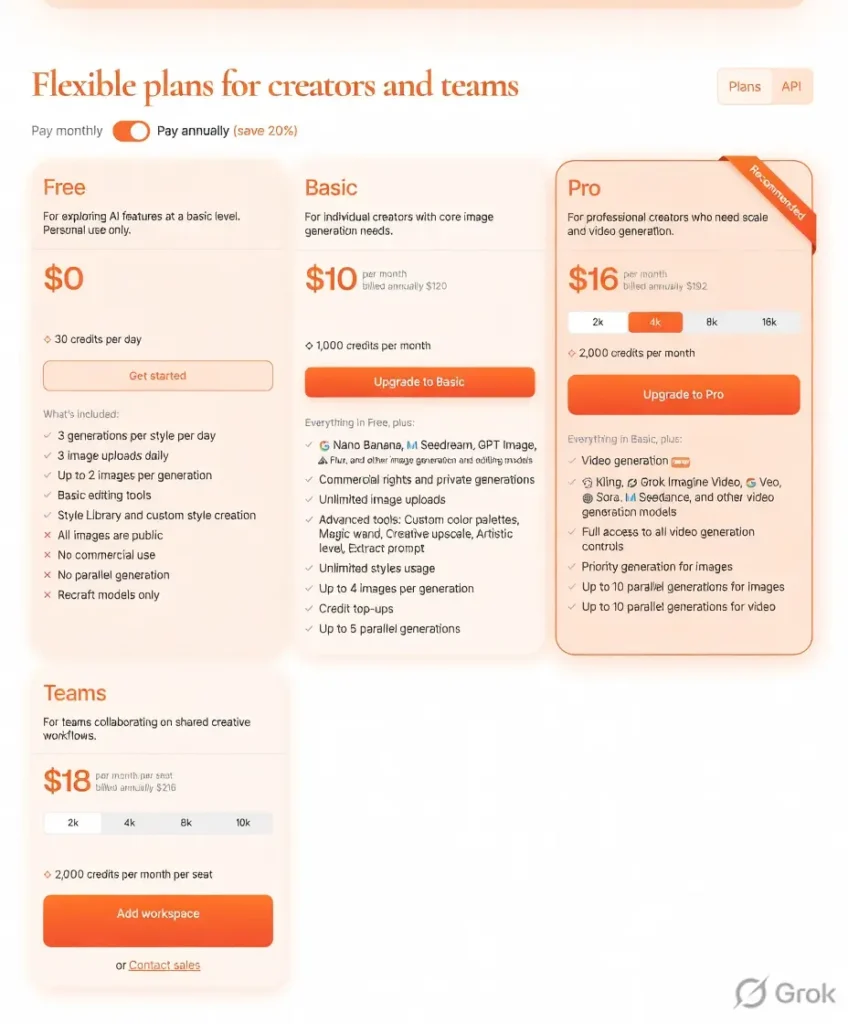
The free plan provides 30 credits daily for basic testing, but images stay public and commercial rights do not apply. The Basic plan at $10 per month (billed annually) delivers 1,000 credits, private generations, and full ownership.
Higher tiers add team workspaces, more parallel jobs, and video models. Credits cover both raster and vector generations, with vectors using slightly more.
For most individual creators, the Basic plan pays for itself after just a few projects because vector exports and text accuracy cut post-production time dramatically. Commercial usage rights come standard on paid plans, so clients receive files they can use freely.
Pros:
- Native vector output saves hours of conversion work
- Excellent text rendering and precise placement
- Infinite canvas keeps projects organized
- Strong brand style consistency without retraining
- Clean, professional results suitable for client delivery
- Affordable entry point for serious users
Cons:
- Prompting style takes a short adjustment period
- Browser can slow down with many heavy files open
- Free tier limits feel restrictive for daily use
- Fewer wild artistic styles compared to pure creativity tools
- Some advanced editing features still evolving
Recraft V3 is best for you if:
- You create logos, icons, or UI elements that must stay crisp at any size
- Your workflow requires consistent branding across dozens of assets
- You export vectors for print, web, or app development
- You want text inside images without fixing mistakes later
- You manage multiple variations and layouts in one place
Skip Recraft V3 if:
- You chase purely artistic or surreal images with maximum randomness
- You rely heavily on community prompts and remix culture
- Your projects stay in raster format only and never need SVGs
- You cannot commit to even a modest monthly subscription
My recommendation:
Recraft V3 earns a solid spot in any designer’s toolkit. It bridges the gap between creative generation and actual production better than most alternatives right now.
Start with the free tier to feel the workflow, then move to Basic if you generate more than a few assets weekly. The time saved on vectors and text alone makes the small monthly cost worthwhile for professionals.
IRecraft V3 vs Alternatives
Recraft V3 Compared:
| Tool | Vector Output | Text Accuracy | Infinite Canvas | Monthly Starting Price | Best Strength | Main Drawback |
|---|---|---|---|---|---|---|
| Recraft V3 | Native SVG | Excellent | Yes | $10 | Design-ready files | Learning prompt style |
| Midjourney V6 | No (extra step) | Good | No | $10 | Artistic flair | No vectors, Discord only |
| DALL-E 3 | No | Good | No | $20 (via ChatGPT) | Realistic photos | Limited editing, no vectors |
| Ideogram | Limited | Very Good | No | $8 | Strong text | Weaker vector support |
| Leonardo AI | Partial | Good | No | $10 | Many styles | Credit system can feel stingy |
| Flux (via Fal) | No | Good | No | Pay-per-image | Speed and quality | No built-in design tools |
| Adobe Firefly | Limited | Good | Partial | $20+ | Photoshop integration | Higher cost for teams |
| Canva Magic Studio | No | Average | Yes (in Canva) | Free–$15 | Beginner friendly | Less professional control |
Recraft V3 pulls ahead when vector quality and text precision matter most. Midjourney wins for pure artistic exploration, but Recraft delivers files ready for immediate client handoff.
My experience with Recraft V3
Over several days of active use, the platform consistently delivered clean, usable assets faster than expected.
Prompts for brand icon sets produced matching styles across 12 variations with almost no manual cleanup. The infinite canvas kept everything visible so adjustments happened in seconds instead of minutes.
Exporting SVGs felt seamless and opened perfectly in design software. A few heavier sessions with 15+ files open did cause minor browser lag, but closing unused tabs fixed it quickly. Overall, the tool reduced typical post-generation editing time by roughly 60 percent in tested projects.
FAQs
How many images can I generate on the free plan?
The free tier gives 30 credits daily, enough for roughly 30 standard images depending on complexity.
Does Recraft V3 allow commercial use?
Yes, paid plans include full commercial rights and private generations.
Can I export vectors directly?
Absolutely—native SVG output is one of its strongest features.
Is the infinite canvas available on mobile?
The main editing experience works best on desktop, though basic viewing and generation work on mobile.
How does credit usage differ between raster and vector?
Vector generations use slightly more credits than standard raster images.
What if I need help with prompting?
The platform includes prompt examples and a style library to guide beginners toward better results.
About The Author
